Trying Out Airflow — Quick Start
→ 日本語版を読むFollowing the Airflow Quick Start, I'll install Airflow on WSL Ubuntu 20.04.
The following is excerpted from the Quick Start.
# Airflow needs a home. `~/airflow` is the default, but you can put it
# somewhere else if you prefer (optional)
export AIRFLOW_HOME=~/airflow

# Install Airflow using the constraints file
AIRFLOW_VERSION=2.4.0
PYTHON_VERSION="$(python --version | cut -d " " -f 2 | cut -d "." -f 1-2)"
# For example: 3.7
CONSTRAINT_URL="https://raw.githubusercontent.com/apache/airflow/constraints-${AIRFLOW_VERSION}/constraints-${PYTHON_VERSION}.txt"
# For example: https://raw.githubusercontent.com/apache/airflow/constraints-2.4.0/constraints-3.7.txt
pip install "apache-airflow==${AIRFLOW_VERSION}" --constraint "${CONSTRAINT_URL}"

# The Standalone command will initialise the database, make a user,
# and start all components for you.
airflow standalone

# Visit localhost:8080 in the browser and use the admin account details
# shown on the terminal to login.
# Enable the example_bash_operator dag in the home page
Running airflow standalone creates an airflow.cfg file.
ls airflow/
airflow-webserver.pid  airflow.cfg  airflow.db  logs  standalone_admin_password.txt  webserver_config.py
The first 50 lines of airflow.cfg (excerpt). Various variables are assigned values. It seems default values can be overridden using environment variables.
You can override defaults using environment variables
For details on variables and their default values, refer to the Configuration Reference.
[core]
# The folder where your airflow pipelines live, most likely a
# subfolder in a code repository. This path must be absolute.
dags_folder = /home/bluen/airflow/dags

# Hostname by providing a path to a callable, which will resolve the hostname.
# The format is "package.function".
#
# For example, default value "airflow.utils.net.getfqdn" means that result from patched
# version of socket.getfqdn() - see https://github.com/python/cpython/issues/49254.
#
# No argument should be required in the function specified.
# If using IP address as hostname is preferred, use value ``airflow.utils.net.get_host_ip_address``
hostname_callable = airflow.utils.net.getfqdn

# Default timezone in case supplied date times are naive
# can be utc (default), system, or any IANA timezone string (e.g. Europe/Amsterdam)
default_timezone = utc

# The executor class that airflow should use. Choices include
# ``SequentialExecutor``, ``LocalExecutor``, ``CeleryExecutor``, ``DaskExecutor``,
# ``KubernetesExecutor``, ``CeleryKubernetesExecutor`` or the
# full import path to the class when using a custom executor.
executor = SequentialExecutor

# This defines the maximum number of task instances that can run concurrently per scheduler in
# Airflow, regardless of the worker count. Generally this value, multiplied by the number of
# schedulers in your cluster, is the maximum number of task instances with the running
# state in the metadata database.
parallelism = 32

# The maximum number of task instances allowed to run concurrently in each DAG. To calculate
# the number of tasks that is running concurrently for a DAG, add up the number of running
# tasks for all DAG runs of the DAG. This is configurable at the DAG level with ``max_active_tasks``,
# which is defaulted as ``max_active_tasks_per_dag``.
#
# An example scenario when this would be useful is when you want to stop a new dag with an early
# start date from stealing all the executor slots in a cluster.
max_active_tasks_per_dag = 16

# Are DAGs paused by default at creation
dags_are_paused_at_creation = True

# The maximum number of active DAG runs per DAG. The scheduler will not create more DAG runs
# if it reaches the limit. This is configurable at the DAG level with ``max_active_runs``,
# which is defaulted as ``max_active_runs_per_dag``.
max_active_runs_per_dag = 16

# Whether to load the DAG examples that ship with Airflow. It's good to
# get started, but you probably want to set this to ``False`` in a production
There's a line executor = SequentialExecutor in airflow.cfg. The SequentialExecutor option runs tasks on a single instance. Other executors exist besides SequentialExecutor: LocalExecutor, CeleryExecutor, DaskExecutor, KubernetesExecutor, and CeleryKubernetesExecutor. Refer to Executor Types for details on each executor.
Since I started the Airflow server with airflow standalone, it's running in standalone mode — i.e., using SequentialExecutor.
Incidentally, the airflow standalone command appears to collectively execute the following commands. Looking briefly, it seems to start the DB, create a user, start the webserver, and start the scheduler.
What is the DB used for? And what is the scheduler?
Setting those questions aside for now, let me try accessing the web server.
airflow db init

airflow users create \
    --username admin \
    --firstname Peter \
    --lastname Parker \
    --role Admin \
    --email spiderman@superhero.org

airflow webserver --port 8080

airflow scheduler
Access http://localhost:8080/login/ in the browser. Use the username and password that were output when the airflow standalone command was run. The output should look like this:
standalone | Airflow is ready
standalone | Login with username: admin  password: kTBTQWBKZAP2S5Ns
standalone | Airflow Standalone is for development purposes only. Do not use this in production!
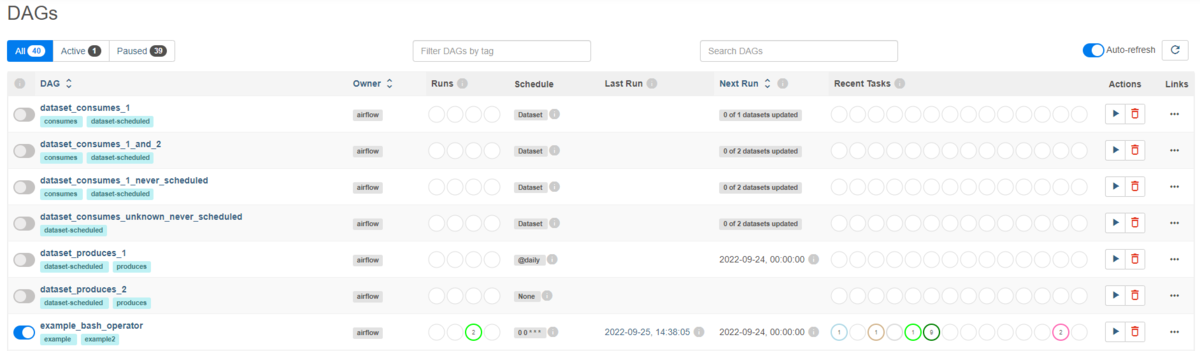
After logging in, the following screen is displayed. 40 DAGs are already registered.

In the GUI, click the ▶ button for example_bash_operator to run the DAG. You can see that the DAG is executing.
Let's look at the DAG details. What is example_bash_operator doing? I'm not sure...
A lot of questions remain, but let's move on for now.
Next time, I'd like to try the Airflow Tutorial.