I Didn't Understand Airflow, So I Studied on Udemy — Part 2
→ 日本語版を読むOverview
Notes from studying the Airflow course on Udemy.
This post mainly covers pre-setup and code.
(Pre-setup) Docker Was Too Heavy, So I Used Airflow Standalone
The Udemy course uses Docker to run not just Airflow but also containers for PostgreSQL and other services, which maxed out the memory on my modest PC.
So I used the airflow standalone command from the Airflow Quick Start to avoid starting any unnecessary resources.
However, since PostgreSQL appears in the course's code, I installed PostgreSQL itself and the PostgreSQL Provider in advance.
# Install PostgreSQL
sudo apt install postgresql

# Install libpq-dev
# !! NOTE !! : Not installing this caused the PostgreSQL provider installation to fail
sudo apt install libpq-dev

# Install PostgreSQL provider
pip install apache-airflow-providers-postgres

# Start PostgreSQL
sudo service postgresql start

# Switch to the "postgres" user
sudo -u postgres -i

# Enter PostgreSQL
psql

# Create DB "airflow_db"
CREATE DATABASE airflow_db;
For PostgreSQL reference commands, see here. Use these to verify the DB was created.
Setting Up Connections in the Airflow UI
Configure Connections in the Airflow UI.
PostgreSQL connection info:
Set the user, password, and DB (Schema) for the PostgreSQL created above.

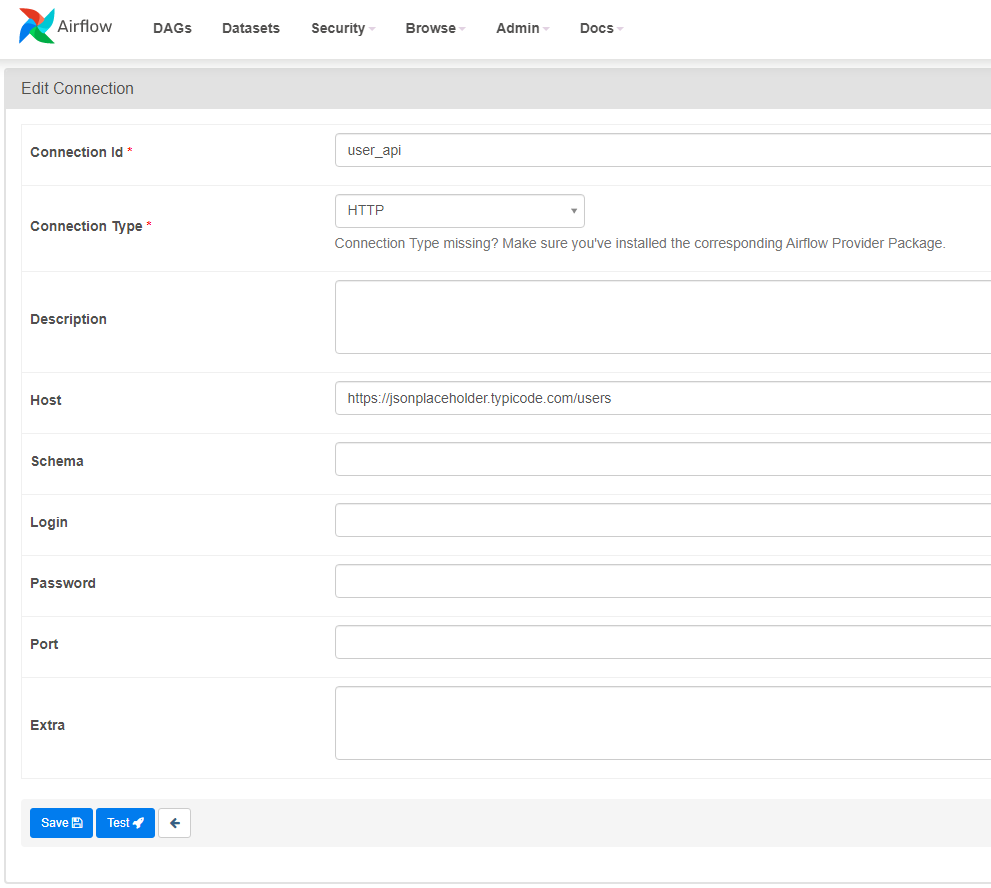
HTTP connection info:
Using a different API endpoint from the one in the Udemy course.
Writing Airflow Code
Create user_processing.py under ~/airflow/dags. It will appear in the Airflow UI DAGs view within 5 minutes.

For code explanations, refer to the comments in the code.
user_processing.py
from airflow import DAG
from airflow.providers.postgres.operators.postgres import PostgresOperator
from airflow.providers.http.sensors.http import HttpSensor
from airflow.providers.http.operators.http import SimpleHttpOperator
from airflow.operators.python_operator import PythonOperator
from airflow.hooks.postgres_hook import PostgresHook
from datetime import datetime
from pandas import json_normalize
import json

# To extract attribute values from a task, write "ti" as an argument (I don't fully understand the details)
def _process_website(ti):
    # Use XCOM to pass messages between tasks
    # Receive the value from the "extract_website" task
    users_from_website = ti.xcom_pull(task_ids="extract_website")
    users = users_from_website[0]
    # Edit into JSON
    processed_user = json_normalize({
        'firstname': users['name'],
        'lastname': users['username'],
        'country': users['address']['city'],
        'username': users['username'],
        'password': users['username'],
        'email': users['email'] })
    # Write to CSV file
    processed_user.to_csv('/tmp/processed_website.csv', index=None, header=False)

def _store_user():
    # Use PostgresHook to copy data from the CSV file to a Postgres table
    hook = PostgresHook(postgres_conn_id='postgres')
    hook.copy_expert(
        sql="COPY test_table FROM stdin WITH DELIMITER as ','",
        filename='/tmp/processed_website.csv'
    )

# Define the DAG
# 'user_processing' is the DAG ID. It must be unique within the Airflow cluster.
with DAG('user_processing', start_date=datetime(2022,9,28), schedule_interval='*/1 * * * *',catchup=False) as dag:

    # task_id must be unique within the DAG
    # Use PostgresOperator to connect to PostgreSQL and execute SQL
    # PostgreSQL connection info is defined in Connections in the Airflow UI
    # The value set in postgres_conn_id becomes the identifier for Connections
    create_table = PostgresOperator(
        task_id="create_table",
        postgres_conn_id="postgres",
        sql='''
            CREATE TABLE IF NOT EXISTS test_table (
                firstname TEXT NOT NULL,
                lastname TEXT NOT NULL,
                country TEXT NOT NULL,
                username TEXT NOT NULL,
                password TEXT NOT NULL,
                email TEXT NOT NULL
            );
        '''
    )

    # HttpSensor checks whether the API endpoint is running
    # HTTP endpoint info is defined in Connections in the Airflow UI
    is_api_available = HttpSensor (
        task_id="is_api_available",
        http_conn_id="user_api",
        endpoint=""      # Write the API endpoint path. No path specified this time.
    )

    # This SimpleHttpOperator GETs the API endpoint and stores the result in response_filter
    # response_filter can process before storing. Here it converts to JSON.
    extract_website = SimpleHttpOperator(
        task_id="extract_website",
        http_conn_id="user_api",
        endpoint="", # Specify the path of the endpoint URL
        method="GET",
        response_filter=lambda response: json.loads(response.text),
        log_response=True
    )

    # Uses PythonOperator to call the function _process_website()
    process_website = PythonOperator(
        task_id='process_website',
        python_callable=_process_website
    )

    # Uses PythonOperator to call the function _store_user()
    store_user = PythonOperator(
        task_id='store_user',
        python_callable=_store_user
    )

    # Define task execution order using >>
    create_table >> is_api_available >> extract_website >> process_website >> store_user