Oracle Master Silver SQL Study Notes
→ 日本語版を読むMain Data Types
- NUMBER: integers and decimals
- CHAR(n): fixed-length string of n bytes
- VARCHAR2(n): variable-length string of up to n bytes
- BLOB: binary data (up to 128 terabytes)
- CLOB: character strings (up to 128 terabytes)
- DATE: data containing year, month, day, hour, minute, second
- TIMESTAMP: DATE data plus fractional seconds
Column Aliases
Column aliases can be used in the ORDER BY clause to specify columns, but using them elsewhere causes an error.
Column aliases do not require single quotes, but double quotes are required when there are spaces, special symbols, the case needs to be distinguished, or the first character is not a letter.
It is safest to always enclose them in double quotes.
SELECT <column_name> AS <column_alias> FROM <table_name>;
Strings
Character Literals
A string enclosed in single quotes.
Example: 'person'
Represents the character string data itself.
【IMPORTANT】
Be careful about the difference in usage from double quotes!
Double quotes are used only when specifying column names, column aliases, or object names that contain special characters, require case distinction, or start with a non-letter character.
Using Single Quotes Inside Character Literals
If a string contains a single quote, it can be escaped by doubling the single quote.
That is, 'I'll go to' can be written as 'I''ll go to' to make the single quote recognized as part of the character literal.
Alternatively, q'[I'll go to]' or q'|I'll go to|' can also be used to have the single quote recognized as part of the string.
String Concatenation
Using the || operator, you can concatenate two strings.
Special Tables
DUAL Table
- Automatically created when the database is created
- Readable by all users
- Used for displaying expressions containing constants or function results
SELECT 365*5 FROM dual;
Datetime Data
Datetime data can be obtained in one of the following ways:
- Using the TO_DATE function
- TO_DATE('2022/10/05 10:25:31', 'YYYY/MM/DD HH24:MI:SS')
- TO_DATE('05-Oct-22') — based on the format model of the NLS_DATE_FORMAT parameter
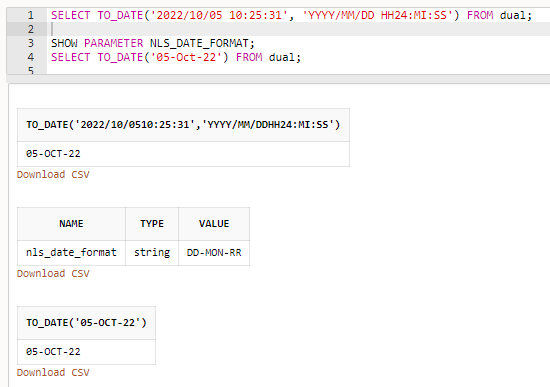
- Implicit conversion by inserting a string into a DATE type column — the string must conform to the format model of the NLS_DATE_FORMAT parameter
Format models for datetime data include the following:
Commands
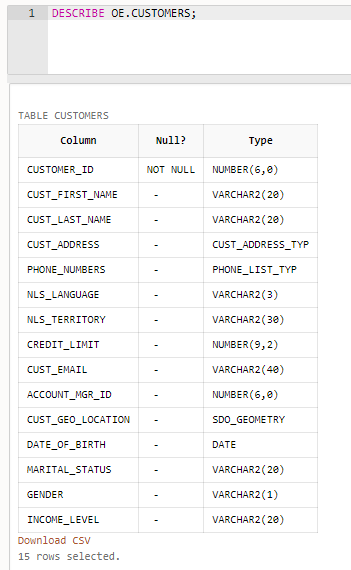
DESCRIBE (DESC)
Allows you to check column names and data types.
Handling NULL
In Oracle, empty strings (zero-length strings) are treated as NULL — be careful.
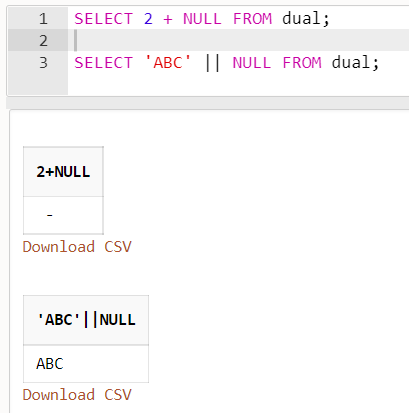
Also, any arithmetic expression containing NULL always evaluates to NULL. 2 + NULL becomes NULL.
However, concatenating NULL with a string results in the string. 'ABC' || NULL becomes 'ABC'.
In SQL, truth values are three-valued: true, false, and unknown.
When comparing a record that has a NULL value using a comparison operator, the result is "unknown."
Therefore, to find records with NULL values, use IS NULL or IS NOT NULL in the WHERE clause.
The book recommends:
Avoid setting NULL or empty strings in column values as much as possible. For numeric data, use 0; for strings, use a value like "unused" ... (abbreviated)
※ Note ※
In the case of BigQuery, since it is a columnar table, having more NULLs (sparse data) actually improves compression, so the above best practice should be understood as applying specifically to Oracle.
Search Conditions
The search conditions available in the WHERE clause.
Sorting
The ORDER BY clause can sort by column name, column position number, or column alias. Sorting by multiple columns is also possible.
NULL appears at the end in ascending order and at the beginning in descending order.
Substitution Variables
DEFINE <variable_name> = <value>
Define a variable and reference it with &<variable_name> or &&<variable_name>.
If DEFINE is not used, you will be prompted to enter the substitution variable value.
&<variable_name> prompts for input each time it is referenced.
&&<variable_name> prompts for input only once.
Built-in Functions
See the following for reference:
Data Type Conversion
Implicit type conversion makes it hard to notice that a conversion is taking place, which can lead to problems.
Also, the behavior may change in future releases.
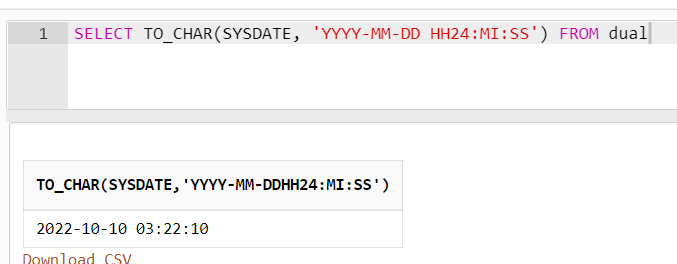
For these reasons, explicit type conversion using functions is preferred.
TO_CHAR(), TO_NUMBER(), and TO_DATE() are available.
Aggregate Functions
Aggregate functions include MAX, MIN, SUM, COUNT, and others.
If a NULL is present in the column passed as an argument to an aggregate function, that NULL is excluded from aggregation.
When using AVG, be careful about NULLs. Records with NULL are not counted in the denominator.
To include NULL records in the aggregation, use the NVL function.
AVG(NVL(point, 0)) will convert NULL in the point column to 0 before calculating the average.
For SUM, MIN, and MAX, the presence of NULLs is generally not a major issue.
However, when COUNT uses an asterisk as its argument — i.e., COUNT(*) — NULLs are also counted.
GROUP BY Clause
Groups rows by the specified column(s). You can also group by a combination of multiple columns.
When using GROUP BY together with a WHERE clause, the WHERE filter is applied before grouping.
On the other hand, the HAVING clause applies a filter on the aggregated result after grouping.
Nesting Aggregate Functions with GROUP BY
In the example below, AVG is first computed per department using GROUP BY, and then MAX is taken over those averages.
This kind of nesting is possible.
SELECT MAX(AVG(salary)) FROM employees GROUP BY dept;
Joins
Think of it as increasing the number of columns by joining two tables.
There are five types of joins:
Repeating joins allows you to join three or more tables.
INNER JOIN(JOIN): inner joinLEFT OUTER JOIN: left outer joinRIGHT OUTER JOIN: right outer joinFULL OUTER JOIN: full outer joinCROSS JOIN: cross join (Cartesian product)
The USING clause can be used instead of the ON clause, but the column names used for joining must be the same in both tables.
You can also prefix NATURAL to JOIN:
NATURAL INNER JOIN(NATURAL JOIN)NATURAL LEFT OUTER JOINNATURAL RIGHT OUTER JOINNATURAL FULL OUTER JOIN
In that case, both tables must have columns with the same name and data type.
Inner Join Using a WHERE Clause
You can perform an inner join using the WHERE clause without using the JOIN clause, as shown below.
List tables separated by commas in the FROM clause.
SELECT ... FROM table1, table2
WHERE table1.column1 = table2.column1
If the join condition in the WHERE clause is omitted, the result is a cross join.
That is, it is equivalent to:
SELECT ...
FROM table1
  CROSS JOIN table2;
Using BETWEEN Instead of '=' in the ON Clause
SELECT ...
FROM table1 JOIN table2
  ON table1.col1 BETWEEN table2.col1 AND table2.col2
Subqueries
Using the result of a SELECT query (subquery) as a condition in the WHERE clause.
Subqueries can be categorized into several patterns.
Detailed explanations are omitted.
Non-correlated subqueries
- Scalar subquery
- The simplest type of subquery. The query result is a single value.
- Non-scalar subquery
- The subquery result is multiple rows, and
IN,ANY,ALL, orEXISTSis used in the WHERE clause. - Or, the subquery result has multiple columns.
- The subquery result is multiple rows, and
Correlated subqueries
- Correlated subquery
- A subquery between two different tables
- Self-correlated subquery
- A subquery that references the same table
For the EXISTS clause, refer to the following:
SQL EXISTS句のサンプル(存在判定/相関副問合せ) | ITSakura
Set Operations
While joins increase the number of columns, set operations on two or more tables add or remove rows.
There are four types of set operators:
- UNION ALL: union — note that duplicate rows from each table are included
- UNION: union
- INTERSECT: intersection
- MINUS: difference — note that the result differs depending on the order of the two tables
The syntax is as follows:
SELECT ... FROM table1 WHERE ...
UNION
SELECT ... FROM table2 WHERE ...
Important Notes!!
- The number of columns and data types in each SELECT must match (if columns are missing, fill with dummy data like NULL,
NONE, or 0) - Column names can differ
DML
Data manipulation is performed using INSERT, UPDATE, MERGE, and DELETE.
INSERT
Inserts a row (record) into the specified table.
Multiple columns and rows can be inserted at once using a subquery.
Multi-table INSERT
Unconditional INSERT
Inserts records into multiple tables:
INSERT ALL
  INTO table1 VALUES (v1, v2)
  INTO table2 VALUES (v3, v4)
Conditional INSERT
- INSERT ALL: inserts a record for every WHEN clause whose condition is satisfied
- INSERT FIRST: inserts a record for only the first WHEN clause whose condition is satisfied
INSERT [ ALL | FIRST ]
  WHEN condition1
  THEN INTO table1 VALUES (v1, v2)
             INTO table2 VALUES (v3, v4)
  WHEN condition2
  THEN INTO table3 VALUES (v5, v6)
             INTO table4 VALUES (v7, v8)
MERGE
The MERGE statement updates the value if a record with the unique key already exists in the target table, and inserts a new row if it does not.
A DELETE operation can be specified instead of an UPDATE operation.
MERGE INTO table1
 USING table2
      ON table1.col = table2.col
 WHEN MATCHED THEN
        UPDATE SET table1.colX = table2.colX
 WHEN NOT MATCHED THEN
        INSERT (table1.colA, table1.colB, table1.colC)
       VALUES (table2.colA, table2.colB, table2.colC)
Transactions
A feature for maintaining data consistency between multiple tables.
A transaction is automatically started when a DML statement (INSERT, UPDATE, MERGE, DELETE) is executed.
A transaction can also be explicitly started with a SET TRANSACTION statement.
SET TRANSACTION NAME 'salary_update';
Executing COMMIT confirms the changes.
COMMIT;
Changes are also confirmed when a connection is terminated normally or when a DDL is issued.
Executing ROLLBACK before COMMIT cancels the changes.
ROLLBACK;
Changes are also rolled back when a connection terminates abnormally.
Savepoints
Executing SAVEPOINT after a transaction has started allows you to return to that saved point using ROLLBACK TO.
Savepoints become invalid when the transaction is committed.
# Define a SAVEPOINT at the desired point
SAVEPOINT save1;

# Return to the savepoint
ROLLBACK TO save1;
Read Consistency
Data that was committed at the time a SELECT statement was executed is returned.
Oracle stores uncommitted data as UNDO data (log).
UNDO data is used to implement transaction rollback, read consistency, and recovery.
Indexes
Creating an index and including the indexed column in a search condition can speed up SQL queries.
CREATE [UNIQUE] INDEX <index_name> ON <table_name> <column>, ..., <column>
An index created on multiple columns is called a composite index.
Specifying UNIQUE creates a unique index. A unique index guarantees that no duplicate values exist in the indexed column(s).
However, unique indexes are not typically created manually, because a unique index is automatically created for any column with a PRIMARY KEY constraint or a UNIQUE constraint.
Indexes only provide a speedup when the number of matching rows is small.
Creating too many indexes increases overhead when row data is updated, so be careful.
Dropping an Index
DROP INDEX <index_name>;
Making an Index Unusable
Marking an index as unusable temporarily frees up the index segment and releases space.
The definition remains in the data dictionary.
ALTER INDEX <index_name> UNUSABLE;
Making an Index Invisible
This can be used to make an index invisible for a period, observe behavior, and then drop the index if there are no issues.
ALTER INDEX <index_name> [ INVISIBLE | VISIBLE ];
Sequences
Sequences allow you to easily generate unique sequential numbers.
CREATE SEQUENCE <sequence_name>
  START WITH <initial_value> INCREMENT BY <increment> MAXVALUE <max_value>
  [CYCLE | NO CYCLE] [CACHE <cache_size> | NO CACHE];
Specifying CYCLE causes the sequence to restart at the initial value when the maximum value is reached.
With NO CYCLE, no more values are generated once the maximum is reached. No error occurs.
CACHE specifies the number of sequence values to cache in memory.
To generate the next sequential number, use <sequence_name>.NEXTVAL. Insert it as the value in an INSERT statement.
To check the most recently generated number, use <sequence_name>.CURRVAL.
To drop a sequence, use DROP SEQUENCE <sequence_name>;.
Note that even if you roll back, previously generated sequence values are not returned, so gaps in the sequence may occur.
Synonyms
An alias given to objects such as tables, views, sequences, functions, and procedures.
To create a synonym for the specified object, execute the following:
CREATE [ OR REPLACE ] [ PUBLIC ] SYNONYM <synonym_name> FOR <object_name>;
Creating a private synonym requires the CREATE SYNONYM system privilege.
Creating a public synonym requires the CREATE PUBLIC SYNONYM system privilege.
Private synonyms are stored in the owning user's schema. Users who can access both the owning user and the object pointed to by the synonym can access the private synonym.
Public synonyms can be accessed by any user. However, access privileges on the object pointed to by the synonym are still required.
To drop a synonym, use DROP [ PUBLIC ] SYNONYM <synonym_name>.
Object and Column Naming Rules
- Length must be 128 bytes or less
- First character must be a letter
- If the first character is not a letter, it must be enclosed in double quotes
- Case is not distinguished. To distinguish case, enclose in double quotes
- Characters other than alphanumeric, $, _, and # must be enclosed in double quotes. This means Japanese characters must be enclosed in double quotes
Constraints
The following constraints can be specified per column or at the table level when creating a table:
- DEFAULT
- Sets a default value for a column. The default value is inserted during INSERT if no value is specified.
- NOT NULL
- UNIQUE
- PRIMARY KEY
- CHECK
- FOREIGN KEY
Example of setting constraints per column
CREATE TABLE <table_name>
  <column_name> <data_type> [ CONSTRAINT <constraint_name> ] DEFAULT <default_value>,
  <column_name> <data_type> [ CONSTRAINT <constraint_name> ] NOT NULL,
  <column_name> <data_type> [ CONSTRAINT <constraint_name> ] UNIQUE,
  <column_name> <data_type> [ CONSTRAINT <constraint_name> ] PRIMARY KEY,
  <column_nameX> <data_type> [ CONSTRAINT <constraint_name> ] CHECK ( <column_nameX> > 100),
  <column_name> <data_type> [ CONSTRAINT <constraint_name> ] REFERENCES <parent_table_name> (<column_name>, ... , <column_name>) [ ON DELETE { CASCADE | SET NULL} ],
Example of setting constraints at the table level
CREATE TABLE <table_name>
  <column_nameA> <data_type>,
  <column_nameB> <data_type>,
  <column_nameC> <data_type>,
  [ CONSTRAINT <constraint_name> ] UNIQUE (<column_name>, ... , <column_name>),
  [ CONSTRAINT <constraint_name> ] PRIMARY KEY (<column_name>, ... , <column_name>),
  [ CONSTRAINT <constraint_name> ] CHECK ( <column_nameA> >= <column_nameB>),
  [ CONSTRAINT <constraint_name> ] FOREIGN KEY (<column_name>, ... , <column_name> REFERENCES <parent_table_name> (<column_name>, ... , <column_name>) [ ON DELETE { CASCADE | SET NULL} ]
DEFAULT and NOT NULL constraints cannot be specified at the table level.
Setting a foreign key constraint prevents data that does not exist in the parent table's reference key from being inserted into the child table's foreign key column.
When setting a foreign key constraint, the parent table's reference key must have a unique constraint.
Setting a foreign key constraint also prevents updating the value of the parent table's reference key.
Furthermore, rows in the parent table cannot be deleted. However, if ON DELETE CASCADE is set, the child table rows are also deleted. If ON DELETE SET NULL is set, the foreign key in the child table is set to NULL.
You can also specify a column from the same table as the reference key. This is called a self-referential foreign key constraint.
To disable/enable a constraint:
ALTER TABLE <table_name> { DISABLE | ENABLE } CONSTRAINT <constraint_name>;
Modifying Tables
- ALTER TABLE ... ADD ...
- Add a column
- The column is added to the rightmost position
- ALTER TABLE ... MODIFY ...
- Set a default value, change a data type, add/remove a NOT NULL constraint
- ALTER TABLE ... DROP ...
- Drop a column
- ALTER TABLE ... SET UNUSED ...
- Mark a column as unused (a workaround when deletion takes too long)
- ALTER TABLE ... UNUSED COLUMNS ...
- Drop columns marked as unused
- ALTER TABLE ... READ ONLY [ READ WRITE]
- Switch to read-only or read-write mode
- ALTER TABLE ... MOVE TABLESPACE ...
- Move the table
- ALTER TABLE ... RENAME TO ...
- Rename the table
Dropping Tables
DROP TABLE ... [ CASCADE CONSTRAINTS ] [ PURGE ];
Specifying PURGE deletes the table permanently without sending it to the recycle bin.
FLASHBACK TABLE ... TO BEFORE DROP;
Restores a table that is in the recycle bin.
Truncating Tables
Deletes all rows. Rows can be deleted faster than with the DELETE statement.
TRUNCATE TABLE ... [DROP STORAGE | DROP ALL STORAGE | REUSE STORAGE] [CASCADE];
TRUNCATE is not subject to rollback or flashback, so once a table is truncated it cannot be restored.
- DROP STORAGE: Releases storage space added after table creation. Default behavior.
- DROP ALL STORAGE: Releases all storage space allocated to the table.
- REUSE STORAGE: Maintains the storage allocated to the table without releasing it.
CTAS
Short for CREATE TABLE AS SELECT — creating a table using a SELECT statement.
CREATE TABLE ... AS SELECT ...;
To copy only the table definition, specify a condition in the WHERE clause that is always false, such as 1=0.
Temporary Tables
Accessible only from the session and automatically deleted when the session ends.
Each session handles them independently.
Stored in the temporary tablespace.
Does not generate REDO logs.
There are two types: private temporary tables (with the above characteristics) and global temporary tables.
Global temporary tables have a table definition shared across the entire database, and the definition is persisted in the data dictionary.
Private temporary table names must begin with ORA$PTT_.
CREATE PRIVATE TEMPORARY TABLE <table_name starting with ORA$PTT_>
  ...
ON COMMIT {DROP | PRESERVE} DEFINITION
[AS SELECT ...];
- ON COMMIT DROP DEFINITION: Table definition and data are automatically deleted at the end of the transaction
- ON COMMIT PRESERVE DEFINITION: Table definition and data are automatically deleted at the end of the session
No naming restriction for global temporary table names.
CREATE GLOBAL TEMPORARY TABLE <table_name>
  ...
ON COMMIT {DELETE | PRESERVE} ROWS
[AS SELECT ...];
- ON COMMIT DELETE ROWS: Table definition and data are automatically deleted at the end of the transaction
- ON COMMIT PRESERVE ROWS: Table definition and data are automatically deleted at the end of the session
External Tables
Allows you to read files in a directory (e.g., CSV files) as if they were Oracle tables.
CREATE TABLE ...
ORGANIZATION EXTERNAL
(
  TYPE ORACLE_LOADER
  DEFAULT DIRECTORY TEST_DIR
  ACCESS PARAMETERS
  (
    fields terminated by ','
  )
  LOCATION('data.csv')
)
Views
A stored SELECT statement with a name.
By granting only access to the view and restricting access to the underlying base table, you can protect data.
CREATE VIEW <view_name>
AS SELECT ...
[WITH READ ONLY] [WITH CHECK OPTION]
To access a view, specify the view name in the FROM clause of a SELECT statement.
To drop a view, execute DROP VIEW.
DROP VIEW <view_name>;
Without WITH READ ONLY, DML can be executed on the view. Executing DML on the view changes the data in the underlying base table.
However, DML cannot be issued on a view if the view definition's SELECT statement contains any of the following:
Set operators, DISTINCT operator, aggregate functions, GROUP BY, ORDER BY
Specifying WITH CHECK OPTION causes a check when DML is issued on the view to verify that the modified data satisfies the WHERE condition of the view definition's SELECT statement. An error occurs if the condition is not satisfied.
INSTEAD OF Trigger
By defining an INSTEAD OF trigger on a view that cannot accept DML, DML can be executed on it.
The following is an example of executing a DELETE statement on a view that otherwise cannot accept DML:
CREATE TRIGGER <trigger_name>
INSTEAD OF DELETE ON <view_name>
BEGIN
  DELETE <table_name> WHERE ... ;
END;
Creating Users
CREATE USER <username>
  IDENTIFIED BY <password>
  DEFAULT TABLESPACE <default_tablespace>
  QUOTA 10M on <tablespace_A>
  QUOTA UNLIMITED on <tablespace_B>
Access
To access an object owned by another user, write it as <schema_name>.<object_name>.
For objects owned by your own user, the schema name can be omitted.
Privileges and Roles
There are two types of privileges: system privileges and object privileges.
System Privileges
- CREATE SESSION (login to the database)
- CREATE TABLE
- CREATE USER, etc.
Object Privileges
- SELECT
- INSERT
- DELETE, etc.
Granting and Revoking System Privileges
GRANT <privilege_name> TO <user> [WITH ADMIN OPTION];
REVOKE <privilege_name> FROM <user>;
Multiple privileges can be specified separated by commas.
To grant a system privilege, you must have been granted that system privilege WITH ADMIN OPTION, or have been granted the GRANT ANY PRIVILEGE system privilege.
If a system privilege granted WITH ADMIN OPTION is revoked, system privileges already granted to other users using WITH ADMIN OPTION are not revoked. (Revocation does not cascade.)
Granting and Revoking Object Privileges
GRANT <privilege_name> [(column_name)] ON <object> TO <user> [WITH GRANT OPTION];
REVOKE <privilege_name> [(column_name)] ON <object> FROM <user>;
Multiple privileges can be specified separated by commas.
Specifying a column name grants the privilege only on that column. Without a column name, the privilege is granted on the entire object.
To grant an object privilege, you must have been granted that object privilege WITH GRANT OPTION, or have been granted the GRANT ANY OBJECT PRIVILEGE system privilege.
If an object privilege granted WITH GRANT OPTION is revoked, object privileges granted to other users using WITH GRANT OPTION are also revoked. (Revocation cascades.)
Roles
A collection of multiple privileges bundled together. Existing roles can also be added to a role.
Modifying a role reflects the change for all users who have been granted that role.
Creating a role, granting/revoking privileges on a role, and dropping a role:
CREATE ROLE <role_name>;
GRANT <privilege> TO <role_name>;
REVOKE <privilege> FROM <role_name>;
DROP ROLE <role_name>;
Granting/revoking a role to/from a user:
GRANT <role_name> TO <user_name>;
REVOKE <role_name> FROM <user_name>;
PUBLIC Role
A special pre-created role.
Granting a privilege to the PUBLIC role grants that privilege to all users.
Data Dictionary
A table that stores internal management information in Oracle, including object definitions such as tables, user information, and role/privilege information.
Owned by the SYS user and stored in the SYSTEM tablespace.
Management information can be referenced by querying data dictionary views.
Main data dictionary views:
- DBA_TABLES
- DBA_INDEXES
- DBA_VIEWS
- DBA_SEQUENCES
- DBA_SYNONYMS
- DBA_CONSTRAINTS
- DBA_USERS
- DBA_TABLESPACES
Timezones
The DATE and TIMESTAMP types do not support timezones.
Use TIMESTAMP WITH TIME ZONE or TIMESTAMP WITH LOCAL TIME ZONE instead.
TIMESTAMP WITH TIME ZONE
- The recorded timezone is stored in the timezone of the session that performed the INSERT. The timezone information (e.g., ASIA/TOKYO) is also stored.
- When data recorded in one timezone is accessed from another timezone, it is read back in the notation of the timezone at the time of recording.
TIMESTAMP WITH LOCAL TIME ZONE
- Data is stored normalized to UTC time.
- When accessed, it is converted according to the session's timezone. For example, if the session timezone is UTC+9:00, the time is displayed in the ASIA/TOKYO timezone.
- The session timezone is automatically determined from the execution environment of the client program.
Datetime Functions
- SYSDATE: Returns the current date and time as a DATE type according to the database server OS timezone.
- SYSTIMESTAMP: Returns the current date and time as a TIMESTAMP type according to the database server OS timezone.
- CURRENT_DATE: Returns the current date and time as a DATE type according to the session timezone.
- CURRENT_TIMESTAMP: Returns the current date and time as a TIMESTAMP WITH TIME ZONE type according to the session timezone.
- LOCAL_TIMESTAMP: Returns the current date and time as a TIMESTAMP type according to the session timezone.