Git Commands on Local
→ 日本語版を読むArchitecture
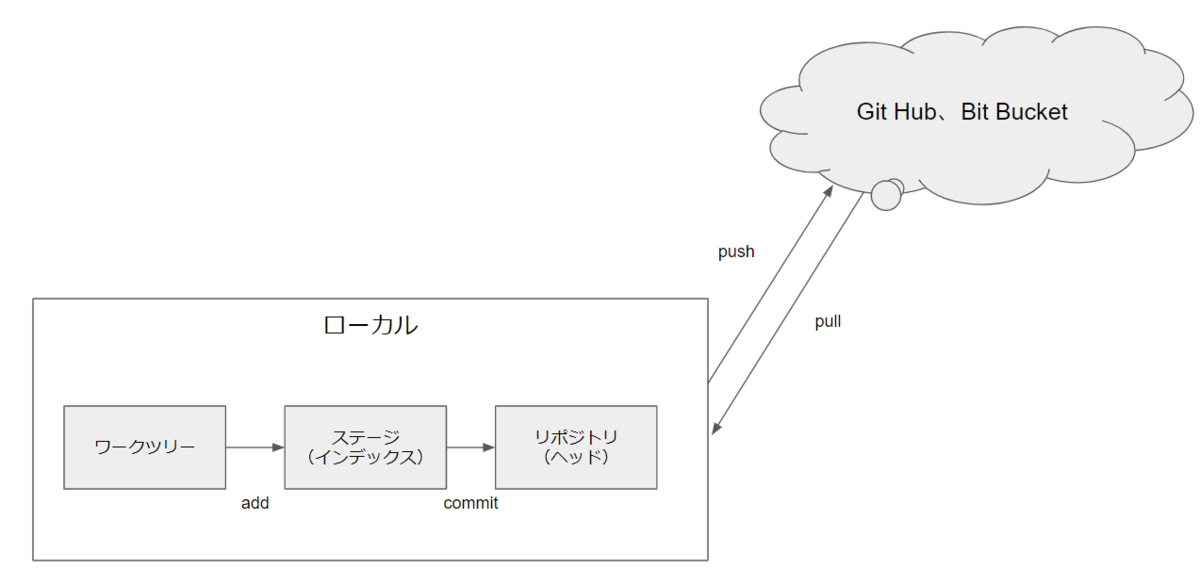
Let's understand the overall architecture.
First, we divide into local PC and cloud. Documents on the local PC are pushed to the cloud (push), or pulled from the cloud (pull).
On the local PC, data is stored in one or all of: working tree, stage, and repository.
Content edited in the working tree is placed in the stage with git add. It's then moved from the stage to the repository with git commit.
Making a First Commit
Add test.txt to the stage:
git add test.txt
git add . adds all files in the folder (working tree).
Now that it's in the stage, we want to commit it to the repository. But the following error occurs:
> git commit -m "1st commit"
Author identity unknown

*** Please tell me who you are.

Run

  git config --global user.email "you@example.com"
  git config --global user.name "Your Name"

to set your account's default identity.
Omit --global to set the identity only in this repository.
An email and username must be registered in advance:
git config --global user.email "you@example.com"
git config --global user.name "Your Name"
Committing again worked:
> git commit -m "1st commit"
[master (root-commit) 54ed5fb] 1st commit
 1 file changed, 1 insertion(+)
 create mode 100644 test.txt
Creating a Branch
Let's check branches. Only the master branch exists. Note: running git branch before the first commit shows nothing — branches only appear after committing.
> git branch
* master
Try creating a dev branch. The asterisk marks the current branch. Note: creating the dev branch doesn't switch to it.
> git branch dev
> git branch
  dev
* master
Use git checkout to switch branches. We can see we've switched to the dev branch.
> git checkout dev
Switched to branch 'dev'
> git branch
* dev
  master
Checking Status
Currently, test.txt contains the string number1:
> cat .\test.txt
number1
Add the string number2 to test.txt:
> cat .\test.txt
number1
number2
The git status command lists files with differences between the repository and stage. modified: test.txt is displayed, meaning "the file has been changed, but has not yet been added to the stage."
> git status
On branch master
Changes not staged for commit:
  (use "git add <file>..." to update what will be committed)
  (use "git restore <file>..." to discard changes in working directory)
        modified:   test.txt

no changes added to commit (use "git add" and/or "git commit -a")
Next, add db.txt:
> git add db.txt
Running git status again shows new file: db.txt was added — meaning "a new file was added to the stage, but hasn't been committed yet."
> git status
On branch master
Changes to be committed:
  (use "git restore --staged <file>..." to unstage)
        new file:   db.txt

Changes not staged for commit:
  (use "git add <file>..." to update what will be committed)
  (use "git restore <file>..." to discard changes in working directory)
        modified:   test.txt
Committing now and checking status shows modified: test.txt is still there because test.txt wasn't added to the stage:
> git commit -m "New file: db.text"
[master 1428b7d] New file: db.text
 1 file changed, 1 insertion(+)
 create mode 100644 db.txt
> git status
On branch master
Changes not staged for commit:
  (use "git add <file>..." to update what will be committed)
  (use "git restore <file>..." to discard changes in working directory)
        modified:   test.txt

no changes added to commit (use "git add" and/or "git commit -a")
Adding test.txt to the stage with git add and then committing shows nothing to commit, working tree clean — confirming everything is committed:
> git add test.txt
> git status
On branch master
Changes to be committed:
  (use "git restore --staged <file>..." to unstage)
        modified:   test.txt

> git commit -m "Add line in test.txt"
[master 338041d] Add line in test.txt
 1 file changed, 2 insertions(+), 1 deletion(-)
> git status
On branch master
nothing to commit, working tree clean
Checking Diff
git diff checks differences between the stage and working tree. git diff --staged checks differences between the stage and repository.
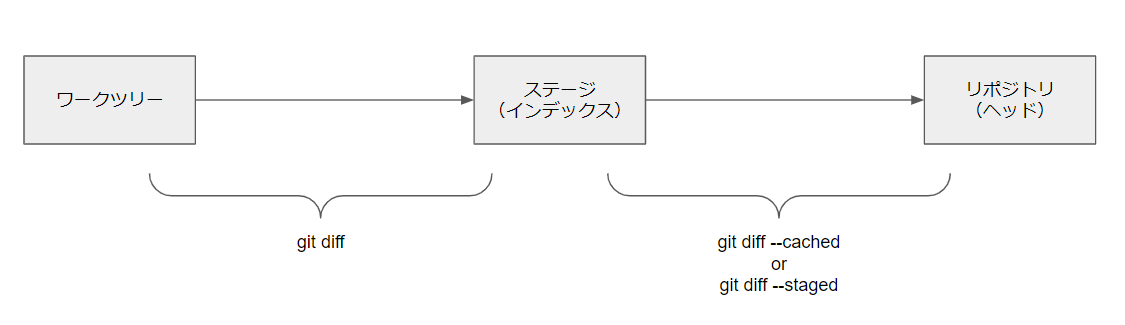
Currently there's a file test2.txt with the content "1". There are no differences between working tree/stage or stage/repository:
> cat test2.txt
1                                                                                                                                                                                                                                               > git diff
> git diff --staged
>
Add "2" to test2.txt and check the diff. git diff shows differences between working tree and stage; git diff --staged shows no difference between stage and repository:
> vim test2.txt
> cat test2.txt
1
2

> git diff
diff --git a/test2.txt b/test2.txt
index d474e1b..c47213d 100644
--- a/test2.txt
+++ b/test2.txt
@@ -1,2 +1,3 @@
 1
+2

> git diff --staged
>
Adding test2.txt to the stage with git add makes the working tree/stage difference disappear, and a difference appears between stage and repository. This can be confirmed with git diff and git diff --staged:
> git add test2.txt
> git diff
> git diff --staged
diff --git a/test2.txt b/test2.txt
index d474e1b..c47213d 100644
--- a/test2.txt
+++ b/test2.txt
@@ -1,2 +1,3 @@
 1
+2
Trying restore
git restore --staged restores the stage based on the repository. git restore restores the working tree based on the stage.

Let's try this out.
First, no differences exist between working tree, stage, and repository:
> cat test2.txt
1
> git diff
> git diff --staged
>
Add "2" to test2.txt. A difference appears between working tree and stage:
> vim test2.txt
> cat test2.txt
1
2
> git diff
diff --git a/test2.txt b/test2.txt
index d474e1b..c47213d 100644
--- a/test2.txt
+++ b/test2.txt
@@ -1,2 +1,3 @@
 1
+2
> git diff --staged
>
Using git restore, the working tree is restored from the stage. The content returns to "1":
> git restore test2.txt
> cat test2.txt
1
Add "2" to test2.txt again and also add it to the stage. A difference appears between stage and repository:
> vim test2.txt
> cat test2.txt
1
2
> git add test2.txt
> git diff
> git diff --staged
diff --git a/test2.txt b/test2.txt
index d474e1b..c47213d 100644
--- a/test2.txt
+++ b/test2.txt
@@ -1,2 +1,3 @@
 1
+2
Using git restore --staged restores the stage from the repository, resolving the stage/repository difference. Because the stage was restored from the repository, a difference now appears between working tree and stage:
> git restore --staged test2.txt
> git diff --staged
> git diff
diff --git a/test2.txt b/test2.txt
index d474e1b..c47213d 100644
--- a/test2.txt
+++ b/test2.txt
@@ -1,2 +1,3 @@
 1
+2