Loading JSON Data into BigQuery
→ 日本語版を読むOverview
With BigQuery, even nested JSON data can be loaded and easily normalized.
For example, if data obtained via an API is in nested JSON format, you can first load it into a BigQuery table, then use BigQuery's UNNEST function to easily unnest and normalize it.
Loading JSON Data into BigQuery
JSON files placed in Cloud Storage or on a GCE instance can be easily loaded into BigQuery.
Strictly speaking, the file format is JSON Lines.
The newline-delimited JSON format is the same as JSON Lines format.
JSON Lines is JSON where each record is separated by a newline and combined into a single file.
The JSON to be loaded this time is as follows:
{
    "metrics": [
      {
        "metric_name": "traffic_in",
        "data": [
          {
            "group": {
              "store_name": "Tokyo"
            },
            "next_level": [
              {
                "group": {
                  "from": {
                    "gregorian": "2023-01-10"
                  }
                },
                "next_level": [
                  {
                    "value": 210,
                    "group": {
                      "start": "12:00"
                    }
                  },
                  {
                    "value": 220,
                    "group": {
                      "start": "13:00"
                    }
                  },
                  {
                    "value": 230,
                    "group": {
                      "start": "14:00"
                    }
                  }
                ]
              }
            ]
          },
          {
            "group": {
              "store_name": "Osaka"
            },
            "next_level": [
              {
                "group": {
                  "from": {
                    "gregorian": "2023-01-10"
                  }
                },
                "next_level": [
                  {
                    "value": 310,
                    "group": {
                      "start": "12:00"
                    }
                  },
                  {
                    "value": 320,
                    "group": {
                      "start": "13:00"
                    }
                  },
                  {
                    "value": 330,
                    "group": {
                      "start": "14:00"
                    }
                  }
                ]
              }
            ]
          },
          {
            "group": {
              "store_name": "Fukuoka"
            },
            "next_level": [
              {
                "group": {
                  "from": {
                    "gregorian": "2023-01-10"
                  }
                },
                "next_level": [
                  {
                    "value": 110,
                    "group": {
                      "start": "12:00"
                    }
                  },
                  {
                    "value": 120,
                    "group": {
                      "start": "13:00"
                    }
                  },
                  {
                    "value": 130,
                    "group": {
                      "start": "14:00"
                    }
                  }
                ]
              }
            ]
          }
        ]
      },
      {
        "metric_name": "traffic_out",
        "data": [
          {
            "group": {
              "store_name": "Tokyo"
            },
            "next_level": [
              {
                "group": {
                  "from": {
                    "gregorian": "2023-01-10"
                  }
                },
                "next_level": [
                  {
                    "value": 210,
                    "group": {
                      "start": "12:00"
                    }
                  },
                  {
                    "value": 220,
                    "group": {
                      "start": "13:00"
                    }
                  },
                  {
                    "value": 230,
                    "group": {
                      "start": "14:00"
                    }
                  }
                ]
              }
            ]
          },
          {
            "group": {
              "store_name": "Osaka"
            },
            "next_level": [
              {
                "group": {
                  "from": {
                    "gregorian": "2023-01-10"
                  }
                },
                "next_level": [
                  {
                    "value": 310,
                    "group": {
                      "start": "12:00"
                    }
                  },
                  {
                    "value": 320,
                    "group": {
                      "start": "13:00"
                    }
                  },
                  {
                    "value": 330,
                    "group": {
                      "start": "14:00"
                    }
                  }
                ]
              }
            ]
          },
          {
            "group": {
              "store_name": "Fukuoka"
            },
            "next_level": [
              {
                "group": {
                  "from": {
                    "gregorian": "2023-01-10"
                  }
                },
                "next_level": [
                  {
                    "value": 110,
                    "group": {
                      "start": "12:00"
                    }
                  },
                  {
                    "value": 120,
                    "group": {
                      "start": "13:00"
                    }
                  },
                  {
                    "value": 130,
                    "group": {
                      "start": "14:00"
                    }
                  }
                ]
              }
            ]
          }
        ]
      }
    ]
  }
Convert this to JSON Lines format (i.e., remove newlines) before loading into BQ.
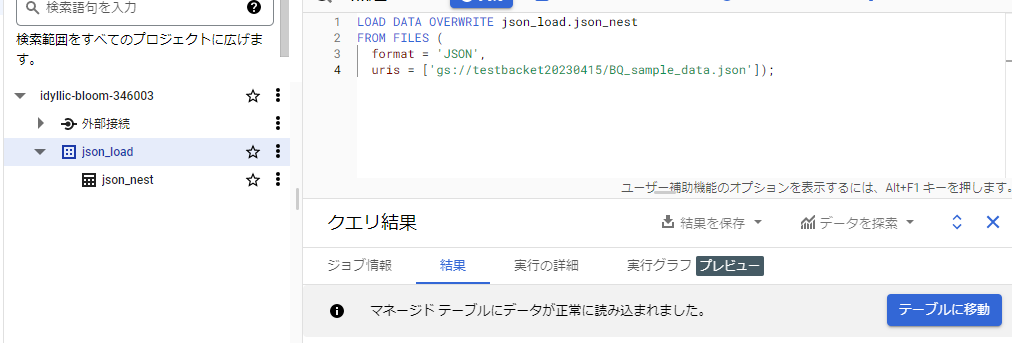
To load it, run the following query:
LOAD DATA OVERWRITE mydataset.mytable
FROM FILES (
  format = 'JSON',
  uris = ['gs://bucket/path/file.json']);
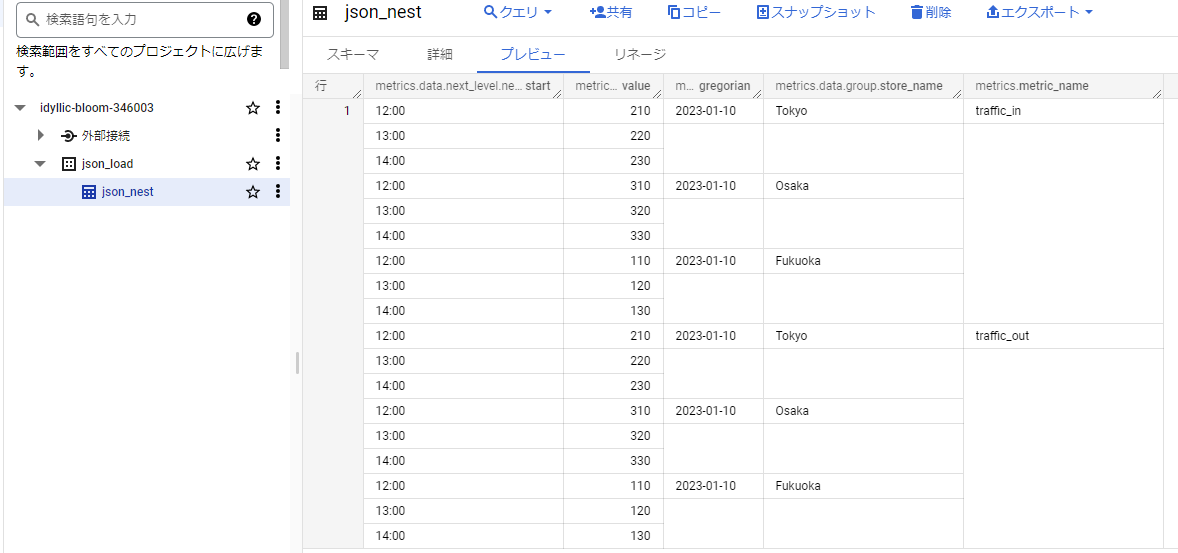
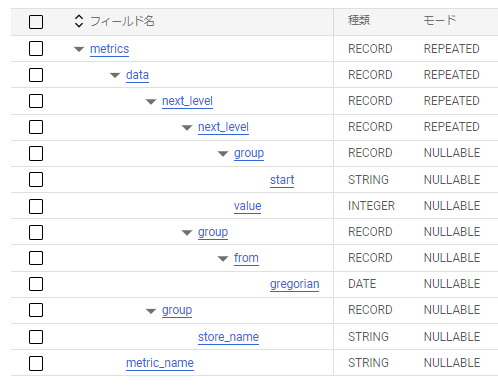
You can see that it is loaded into BigQuery in nested form.
Note that in addition to SQL queries, bq commands and Python libraries are also available.
Loading JSON data from Cloud Storage | BigQuery | Google Cloud
Unnesting Nested Data
Next, let's unnest the nested data.
In BigQuery, writing table names separated by commas in the FROM clause results in a CROSS JOIN.
When CROSS JOINing using the UNNEST function, rather than a general CROSS JOIN, each value in the nested rows targeted by the UNNEST function is joined to the nested rows.
Converting elements in an array to rows in a table
I think it's hard to visualize without trying it, so I recommend actually doing it.
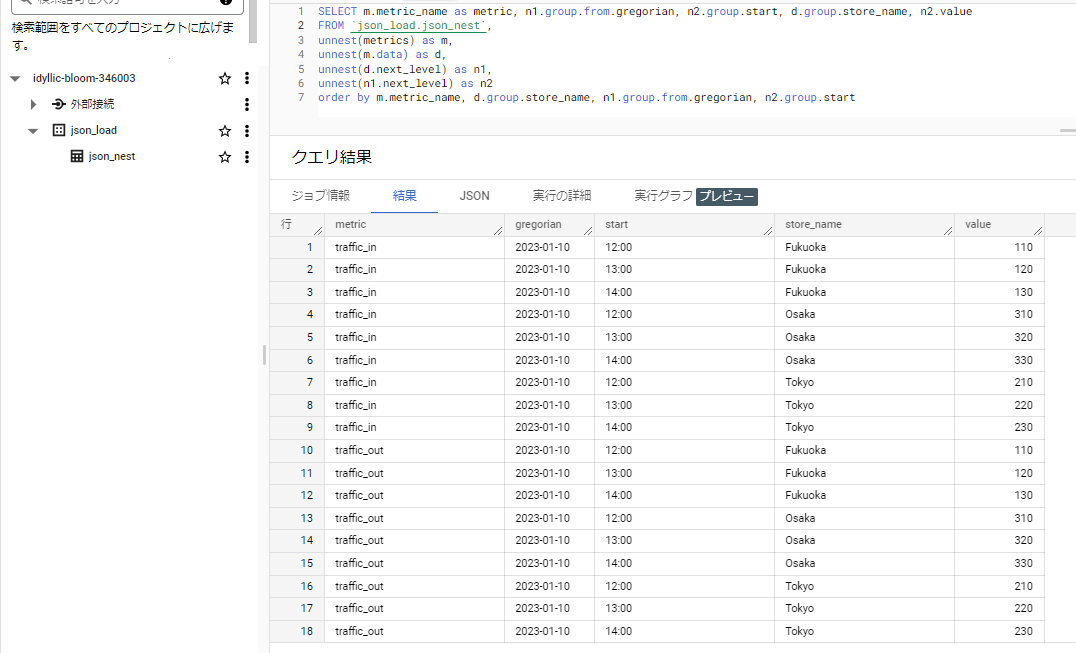
SELECT m.metric_name as metric, n1.group.from.gregorian, n2.group.start, d.group.store_name, n2.value
FROM `project_name.dataset_name.table_name`,
unnest(metrics) as m,
unnest(m.data) as d,
unnest(d.next_level) as n1,
unnest(n1.next_level) as n2
order by m.metric_name, d.group.store_name, n1.group.from.gregorian, n2.group.start
This unnests the data so that each row contains one record.
That's all.