Log Collection in Azure
→ 日本語版を読む- Overview
- Types of logs in Azure and log collection methods
- Resource logs
- Diagnostic settings
- Activity logs
- Azure Active Directory logs
- Virtual machine logs and data collection rules
- Resource logs
- NSG diagnostic settings vs. flow logs
- Types of logs in Azure and log collection methods
Overview
I hadn't had a systematic understanding of log collection methods for each resource in Azure, so I'm summarizing what I researched.
Types of Logs in Azure and Log Collection Methods
Reference: Overview of Azure Platform Logs - Azure Monitor | Microsoft Learn
The three most important types of logs are as follows:
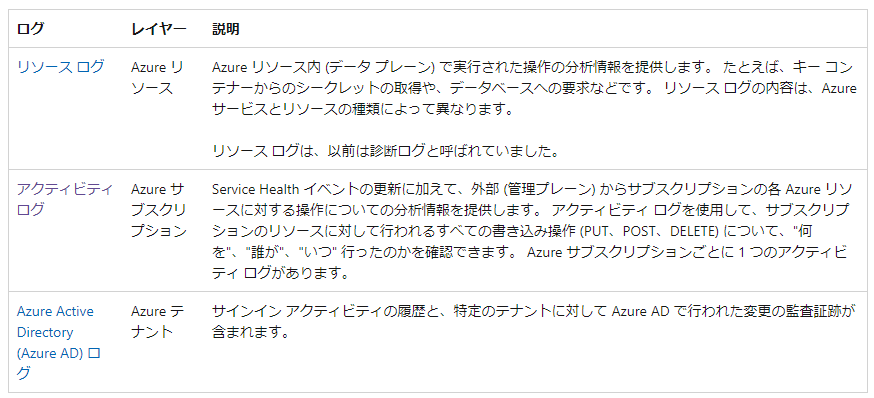
If you broaden the scope, logs from virtual machines and NSGs are also included.
Reference: Azure Security Logging and Auditing | Microsoft Learn

Resource Logs
Resource logs are logs that can be obtained from each Azure resource, showing usage and other details for each resource.
For example, a storage account's resource logs include the following:
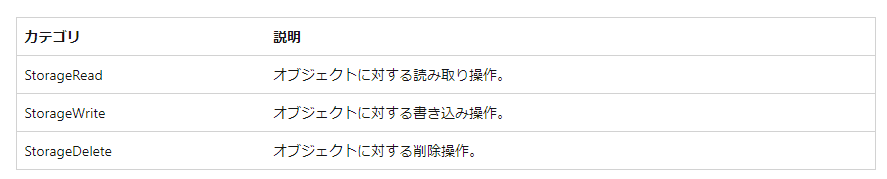
Reference: Monitoring Azure Blob Storage - Azure Storage | Microsoft Learn
The items that can be collected in resource logs differ by resource. For example, Event Hubs can collect the following logs:
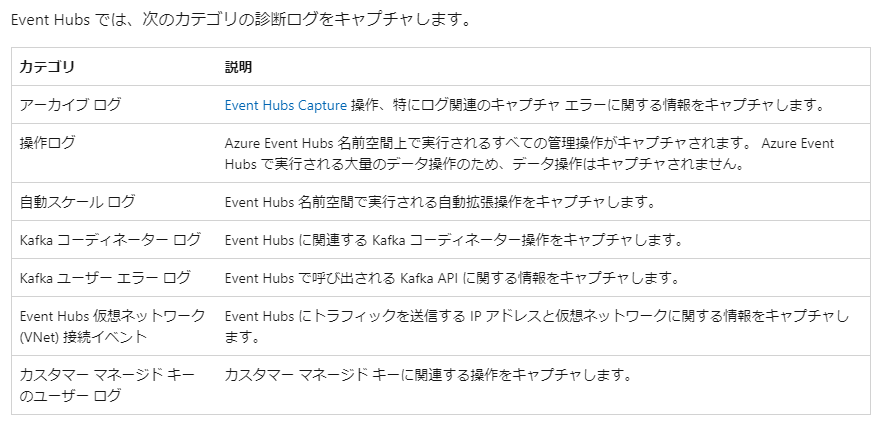
Reference: Azure Event Hubs Monitoring Data Reference - Azure Event Hubs | Microsoft Learn
Diagnostic Settings
Resource logs for PaaS resources can generally be collected in one of the following destinations by configuring diagnostic settings: Log Analytics workspace, Event Hubs, or Azure Storage.
Diagnostic settings allow you to collect not only regular logs but also metric logs. For storage accounts, a metric called Transaction can be collected.
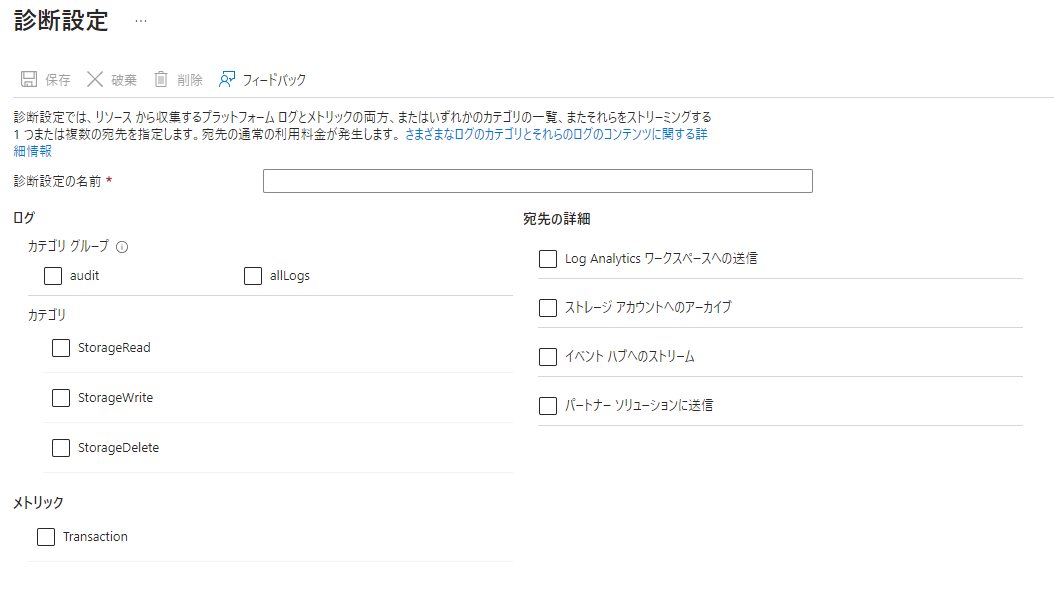
Reference: Azure Storage Analytics Metrics (Classic) | Microsoft Learn
Activity Logs
Activity logs record operations such as creation, updates, and deletion of Azure resources.
They allow you to keep a log of who created (or deleted) a resource and when.
If you have a security requirement to receive alerts when a resource is created, use activity logs.
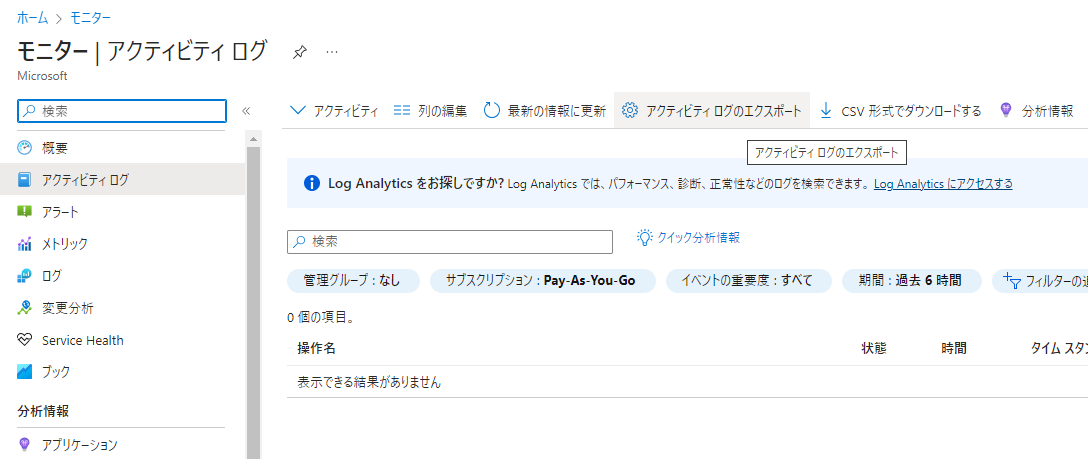
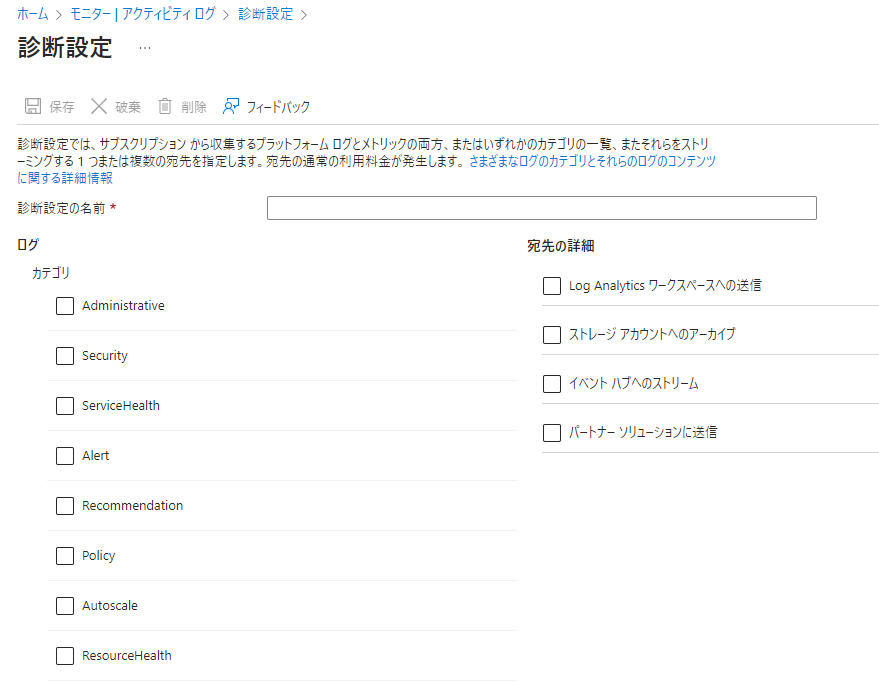
Activity logs can be configured for collection on individual resources, but they can also be configured in bulk for all resources under a subscription.
To configure in bulk via the Azure portal, go to Azure Monitor > Activity Log > Export Activity Log.
Azure Active Directory Logs
In essence, these are just the resource logs for Azure AD. You can collect sign-in logs showing who accessed and when, and audit logs showing what administrative work was done by administrators.
Sign-in logs and audit logs collected by Azure AD can be forwarded to LogAnalytics, Storage Accounts, or Event Hubs.

Virtual Machine Logs and Data Collection Rules
Resource logs for virtual machines can be collected by installing the Azure Monitor Agent on the virtual machine and configuring data collection rules.
The types of logs that can be collected include:
- Windows Event Logs
- Linux Syslog
- Performance counters
- Custom text logs
- IIS logs
Windows Event Logs collect the event logs output by Windows VMs.
Linux Syslog collects logs output to Syslog by Linux VMs.
Performance counters collect metric logs for CPU, memory, disk, and network. For example, logs for CPU and disk usage are collected.
The following are representative counters for CPU, memory, and disk usage:
-
Windows
- [Processor](https://d.hatena.ne.jp/keyword/Processor) Information(_Total)% Processor Time
- \Memory% Committed Bytes In Use
- \LogicalDisk(_Total)% Free Space (note: percentage of free space)
-
Linux
- Processor(*)% Processor Time
- Memory(*)% Used Memory
- Logical Disk(*)% Used Space
Custom text logs collect logs output to any file on the VM.
When collecting logs into LogAnalytics, you need to create a table in the LogAnalytics workspace beforehand.
Reference: Collect text logs using Azure Monitor Agent - Azure Monitor | Microsoft Learn
NSG Diagnostic Settings vs. Flow Logs
For NSGs, you can collect logs either via diagnostic settings or via NSG flow logs through Network Watcher.
NSG flow logs have versions 1 and 2. Version 2 introduces the concept of flow state, and stores information about bytes and packets transferred.
NSG Diagnostic Resource Logs - Azure Virtual Network | Microsoft Learn
NSG Flow Logs - Azure Network Watcher | Microsoft Learn
That's all.