Linux iptablels
→ 日本語版を読むExternal communication control for Docker containers is done using iptables. (reference)
Since I want to understand external communication control for Docker containers, let me first review iptables.
iptables is a tool for packet filtering in Linux. iptables has a successor tool called nftables (though Docker's external communication control uses iptables).
First, install iptables for use.
# yum install iptables-services
# systemctl enable iptables
# systemctl start iptables
There are two concepts needed to understand iptables: tables and chains.
There are four types of tables; the one you'll use most often is probably the filter table. The filter table is used for packet filtering, and filtering rules are added there. Unlike nftables, tables come pre-configured.
In the example below, TCP packets with source address xxx.xxx.xxx.xxx and destination port 80 are dropped.
iptables -t filter -A INPUT -p tcp -s xxx.xxx.xxx.xxx --dport 80 -j DROP
Tables
Tables are specified with -t [table name]. In the above example, the filter table is specified.
- filter table
- Used for filtering
- nat table
- Used for NAT
- mangle table
- raw table
The -A part in the example above. Representative command options are as follows:
- -L : Display all rules in the specified chain
- -A : Append a rule to the end of the specified chain
- -I : Without an argument, adds a rule at the beginning of the chain. With an integer argument, inserts a rule at the specified position in the chain
- -X : Delete the specified chain
Chains
The INPUT part in the example above. Representative chains are as follows:
- INPUT
- Applies rules when receiving packets destined for the local host
- OUTPUT
- Applies rules when a local process generates a packet
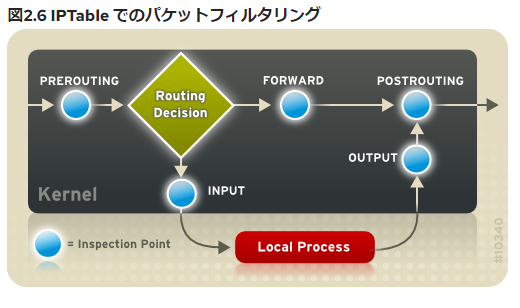
- PREROUTING
- Applies rules when a packet is received, before routing
- POSTROUTING
- Applies rules when a packet is sent
Packets are processed by chains in each table in the following flow:
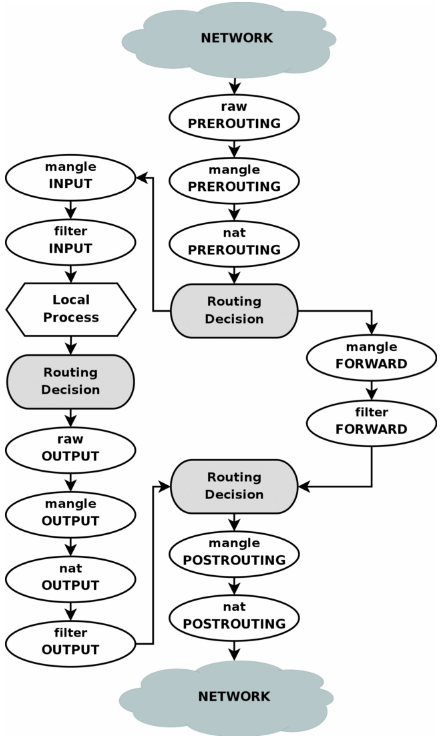
Source: https://rlworkman.net/howtos/iptables/chunkyhtml/c962.html
The -p, -s, and -j parts in the example above. Representative parameter options are as follows:
-p: IP protocol. One oficmp,tcp,udp,all-s: Source IP address-d: Destination IP address/address range-i: Incoming network interface (e.g.,eth0)-o: Outgoing network interface-j: When a packet matches a specific rule, jumps the packet to the specified target (described later). In other words, specifies whether to allow, reject, or drop the matching packet.
The --dport part in the example above.
--sport: Source port--dport: Destination port--tcp-flags: Type of TCP packet such asACK,FIN--icmp-type: Type of ICMP packet such asport-unreachable
The DROP part in the example above.
- ACCEPT
- Allow the packet
- DROP
- Drop the packet. No error packet is sent.
- REJECT
- Discard the packet and send an error packet back to the source.
- RETURN
- Stop checking the packet against the current chain's rules
- LOG
- Log packet information. By default, output to
/var/log/messages. Log output destination is controlled by/etc/syslog.conf.
- Log packet information. By default, output to
Rules created with iptables commands are saved in memory, so all rules are lost on reboot. To persist them across reboots, save the rules to /etc/sysconfig/iptables with the following command:
# service iptables save
References
https://rlworkman.net/howtos/iptables/chunkyhtml/c962.html
https://en.m.wikipedia.org/wiki/File:Netfilter-packet-flow.svg

https://tech-blog.rakus.co.jp/entry/20220301/iptables
https://www.designet.co.jp/faq/term/?id=aXB0YWJsZXM#