4 Interesting Blogs and Videos Related to BigQuery
→ 日本語版を読む1. I spent 3 hours figuring out how BigQuery inserts, deletes and updates data internally. Here's what I found.
A title like a light novel. This article introduces how BigQuery manages files internally with clear diagrams.
When inserting or deleting data, rather than rewriting existing files, it creates new files and updates the file abstraction layer (Storage set) to stop referencing the old files and instead reference the newly created ones.
In other words, once a file is created it is immutable, and whenever data needs to be rewritten, a new file is always created. Old files are used for Time Travel (the feature for accessing data at a past point in time), but after the Time Travel retention period expires, the old files are labeled for garbage collection.
2. Lesson learned after reading the BigQuery academic paper: Shuffle operation
This article explains the evolution from Map-Reduce to BigQuery (Dremel engine).
In Map-Reduce, mapper machines used local storage (memory or disk), whereas the Dremel engine used in BigQuery separates storage from the machines.
3. BigQuery Admin reference guide: Query processing
This article provides an overview of how queries are processed in BigQuery.

4. BigQuery Admin reference guide: Query optimization
This is an official GCP article about how to write optimal queries in BigQuery.
-
In WHERE clause expressions, put conditions that reduce the number of records more first.
-
In joins, put the largest table first. (Since join reordering only occurs under certain conditions, it is important for users to be mindful of join order.)
-
Before joining, reduce the number of records as much as possible with the WHERE clause.
-
For pattern matching, the processing cost increases in the order:
=<LIKE< regular expression. -
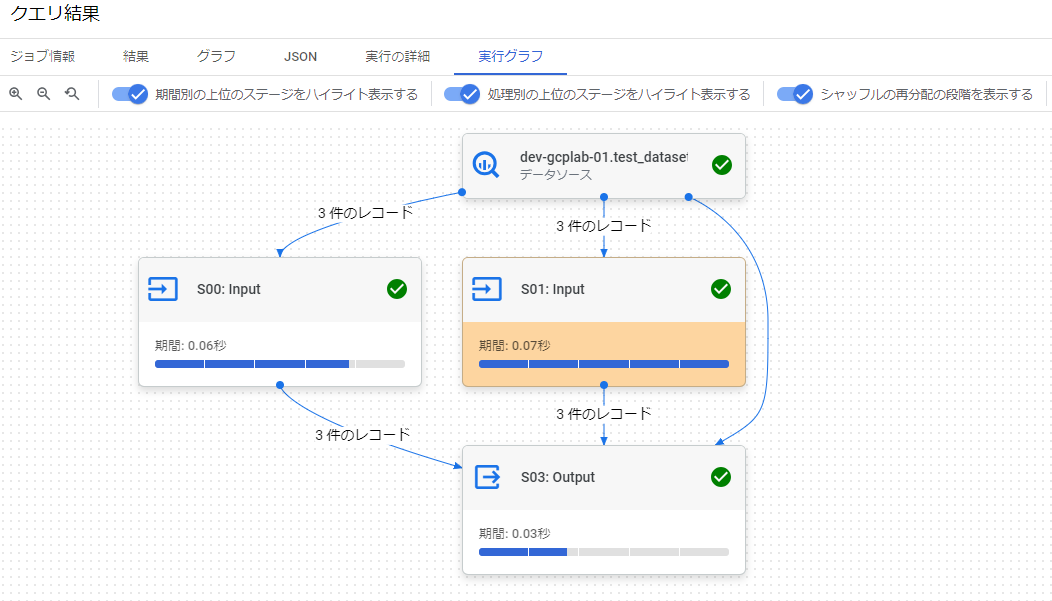
Use temporary tables instead of WITH clauses. Every time a WITH clause alias is referenced, the subquery is executed.
- I was skeptical about whether this is really the case, so I tried it out.
WITH s AS (
  SELECT *
  FROM `dev-gcplab-01.test_dataset.staff`
)
SELECT *
FROM s AS a
JOIN s AS b
ON a.id = b.id
JOIN s AS c
ON a.id = c.id
When the WITH clause subquery is repeatedly referenced in JOINs as shown above, I confirmed that the input indeed becomes 2 inputs + 1 data source, totaling 3 inputs.
-
For cases like extracting the latest record per ID, use ARRAY_AGG instead of the ROW_NUMBER function.
-
ROW_NUMBER
sql WITH t AS ( SELECT * ,ROW_NUMBER() OVER( PARTITION BY id ORDER BY updated_at DESC) rn FROM test_dataset.purchase ) SELECT * EXCEPT(rn) FROM t WHERE rn = 1; -
ARRAY_AGG
sql SELECT ARRAY_AGG( s ORDER BY updated_at LIMIT 1 )[OFFSET(0)] FROM test_dataset.purchase s GROUP BY id;
-
-
The videos on YouTube also look useful.